
Blog Post
Introducing Genaptic: Desktop-native AI workflow applications for controlled work
By John Connor Sanders, Founder and CEO
- introduction
- agentic-ai
- desktop-native
- local-first
- workflow-software
- ai-economics
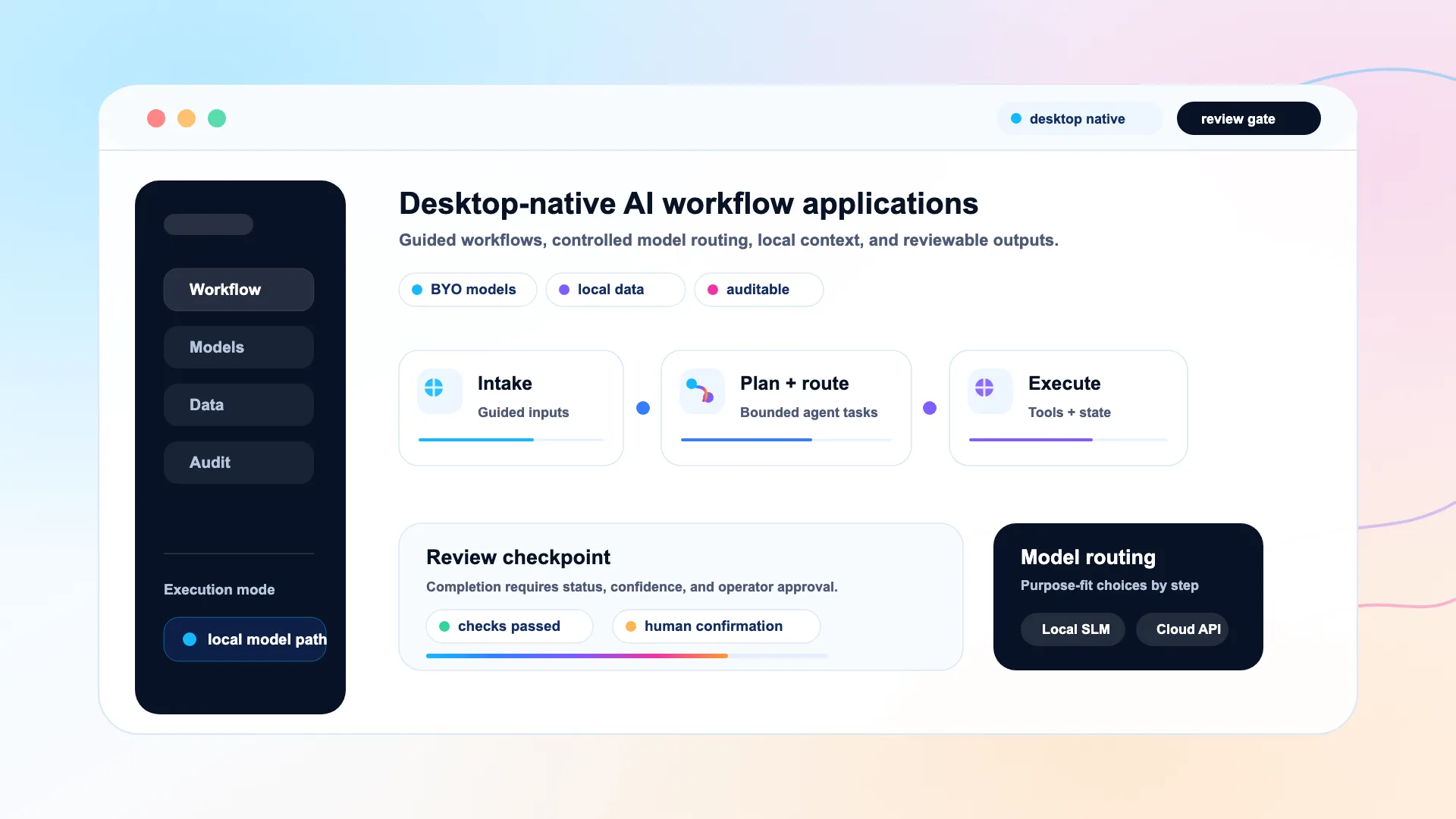
Genaptic builds desktop-native AI workflow applications for teams that need local context, controlled model use, human review, and auditable outputs.
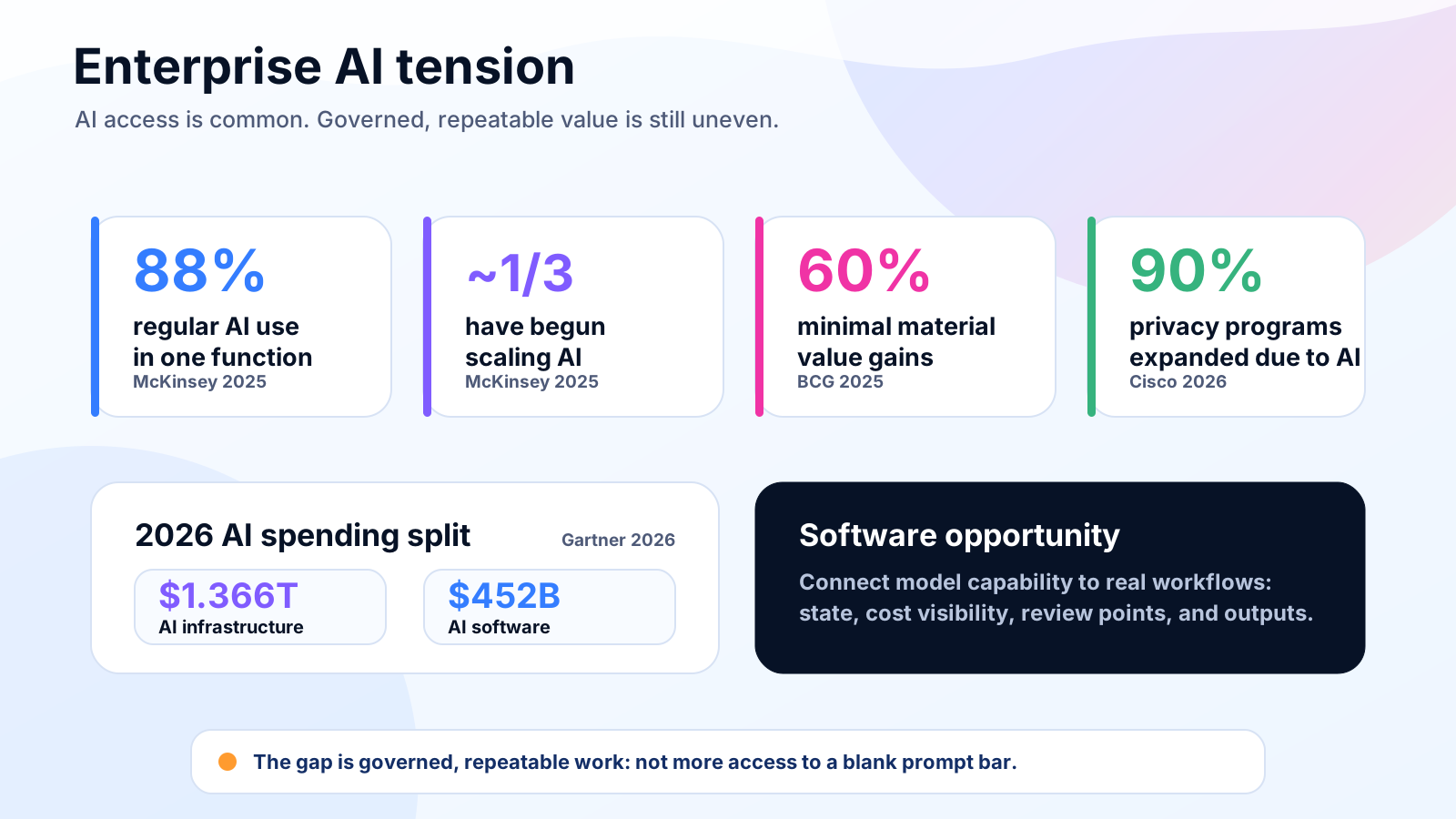
AI access has become easy. Turning AI into governed, repeatable work remains harder. McKinsey’s 2025 State of AI survey found that 88% of respondents say their organizations regularly use AI in at least one business function, while only about one-third say their companies have begun scaling AI programs. McKinsey also found that high performers are more likely to redesign workflows and define when model outputs need human validation. (McKinsey & Company)
That pattern shows up elsewhere. BCG’s 2025 AI value-gap research reported that 5% of firms are “future-built,” 35% are scaling AI and beginning to generate value, and 60% are seeing minimal material revenue and cost gains despite substantial investment. (BCG Global)
At the same time, AI spending continues to grow. Gartner forecasts worldwide AI spending of $2.52 trillion in 2026, up 44% year over year. Much of that spend is going into infrastructure and foundations, with Gartner forecasting $1.366 trillion in AI infrastructure spending and $452 billion in AI software spending for 2026. (Gartner)
The opportunity for Genaptic is in the software layer. Teams do not only need access to models. They need applications that connect model capability to real work: structured inputs, local files, workflow state, cost visibility, review points, and finished outputs.
Motivation
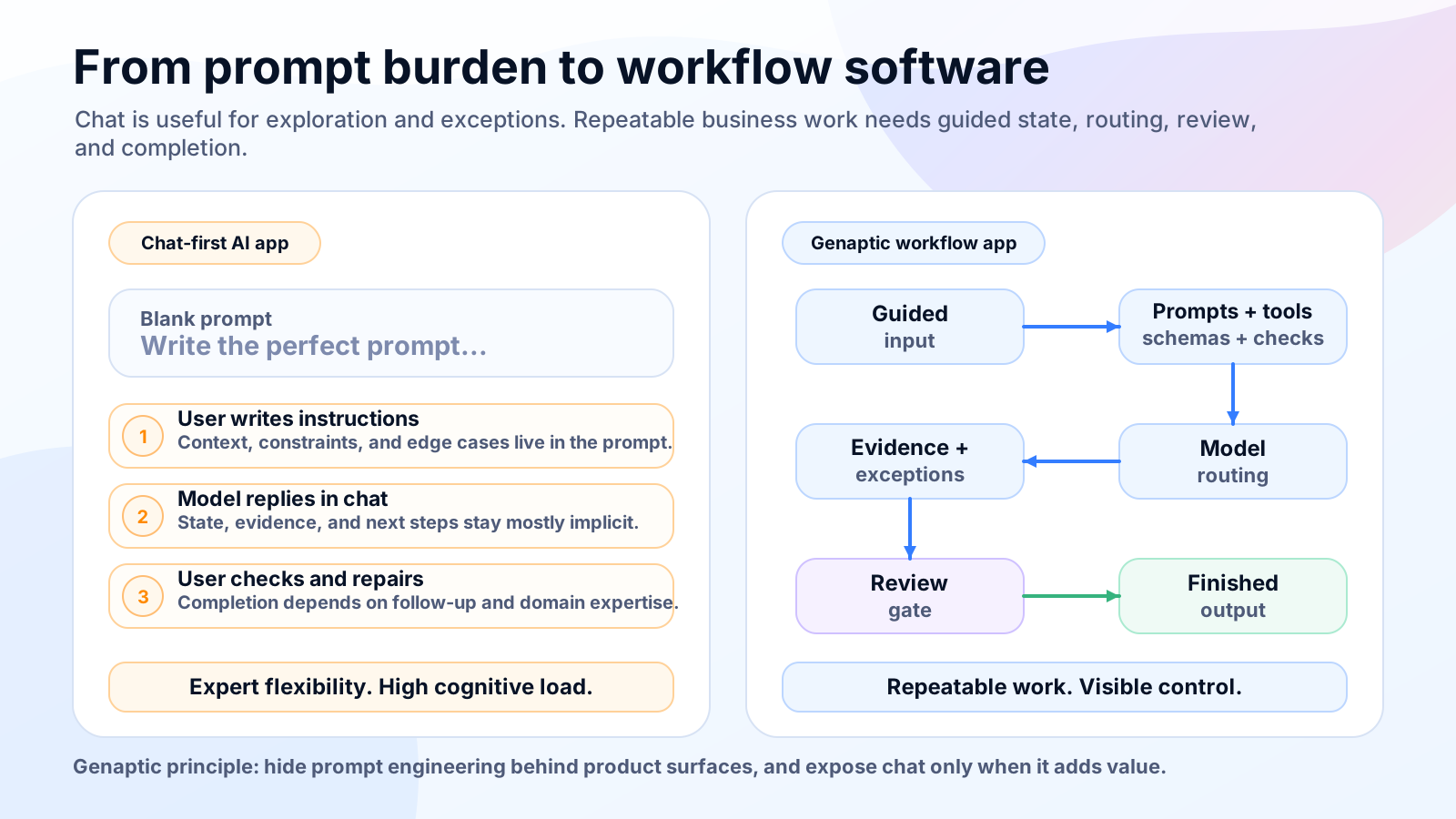
A prompt bar is flexible, but it places too much responsibility on the user.
For exploratory work, that flexibility can be useful. A user can ask an open-ended question, test an idea, or handle an unusual exception. For repeatable business workflows, the same interface becomes a source of variance. The user has to know what to ask, how to ask it, what context to provide, which constraints matter, and how to verify the result.
That is a poor fit for work that should be repeatable.
In a productivity application, a user should not need to write a perfect prompt to classify a file, generate a draft, review a proposed change, compare evidence, or hand off an output. Those actions should be represented by software surfaces: forms, selectors, buttons, progress states, previews, exceptions, approval points, and audit trails.
Nielsen Norman Group has made a related point about AI product design. AI chat can be useful in some contexts, but rushing chat into a product does not solve every user need. AI can also add value through personalization, prediction, automation, and embedded product behavior without forcing every interaction into a conversational interface. (Nielsen Norman Group)
That is the product lens Genaptic brings to business workflows. Chat still has a place when someone needs to explore an exception or ask an open-ended question, but repeatable work should not depend on a user improvising the right prompt. For those workflows, the primary surface should be the application itself: structured steps, clear state, review points, and outputs the team can hand off.
What Genaptic builds
Genaptic builds agentic workflow applications.
By that, we mean software that gives models bounded roles inside explicit workflows. The application defines the inputs, state, tools, routing rules, stopping conditions, review gates, and output artifacts. Models perform specific work inside that system.
This distinction matters because the word “agent” is often used loosely. Anthropic draws a useful architectural line between workflows, where LLMs and tools are orchestrated through predefined code paths, and agents, where LLMs dynamically direct their own process and tool use. Genaptic starts from the workflow side of that distinction and adds agentic nodes where model-driven planning, delegation, or evaluation is useful. (Anthropic)
Genaptic applications share four product principles.
Principle 1: Workflow-first interface
The application guides the user through structured inputs, actions, status, review, and output. The workflow assembles the prompts, tool calls, schemas, policies, and checks required for each step.
The goal is repeatability. Users should be able to run the same kind of work more than once without rebuilding the process in a chat window.
Principle 2: Customer-managed model layer
Customers connect approved providers and local runtimes according to the workflow. That may include OpenAI, Anthropic, Gemini, local Ollama models, or other supported providers.
The product should make model selection explicit. Some steps may need a frontier model. Others may only need a smaller model, an evaluator, an extraction model, or a deterministic tool.
Principle 3: Local-first desktop runtime
Genaptic applications run close to the files, repositories, documents, spreadsheets, contracts, notes, and local data extracts that often contain the real context of the task.
Customer workflow content should remain in the local environment by default. When a configured workflow step requires an external model provider, the application should send only the selected context needed for that step to the approved provider.
Principle 4: Reviewable completion
The product should make important work visible before it is accepted. That means evidence, status, exceptions, confidence signals, diffs, schema reports, and human approval points.
Completion should mean more than receiving a plausible answer. It should mean the workflow produced an inspectable artifact that the user can accept, revise, reject, or hand off.
Architecture at a high level
A Genaptic application organizes the workflow around responsibilities the product can own and show to the user. The local workspace supplies the files and context the workflow is allowed to use, while workflow state records what has happened, what is pending, and which decisions have already been made.
Model routing then maps each workflow node to the appropriate approved provider, local model, or deterministic tool. The tool layer handles work that should not be left to free-form generation, including file parsing, checks, schema validation, output comparison, and report preparation.
The review layer gives the user a place to see what the workflow is doing before a result is accepted: intermediate work, exceptions, proposed changes, and final artifacts. The output layer then turns the completed workflow into the thing the user actually needed, whether that is a code change, report, classification, draft, comparison, data extract, review packet, or handoff. AI is only one part of that path. The application is responsible for collecting context, routing work, preserving state, running checks, and making review possible.
Why desktop-native and local-first matter
Many high-context workflows begin in a local workspace. Source trees, documents, spreadsheets, data extracts, design files, contracts, and notes often already live on the user’s machine or inside a controlled local environment.
A cloud application can be the right environment for many tasks. It can also force sensitive or high-context work away from the place where the relevant material already lives. Genaptic takes a desktop-native approach for workflows where local context, local tools, and data boundaries matter.
The architecture should make the data path visible. Customer workflow content stays local unless a configured step sends selected context to an approved provider. Genaptic services may be used for licensing, updates, and opted-in telemetry, but those paths should be separate from customer workflow content.
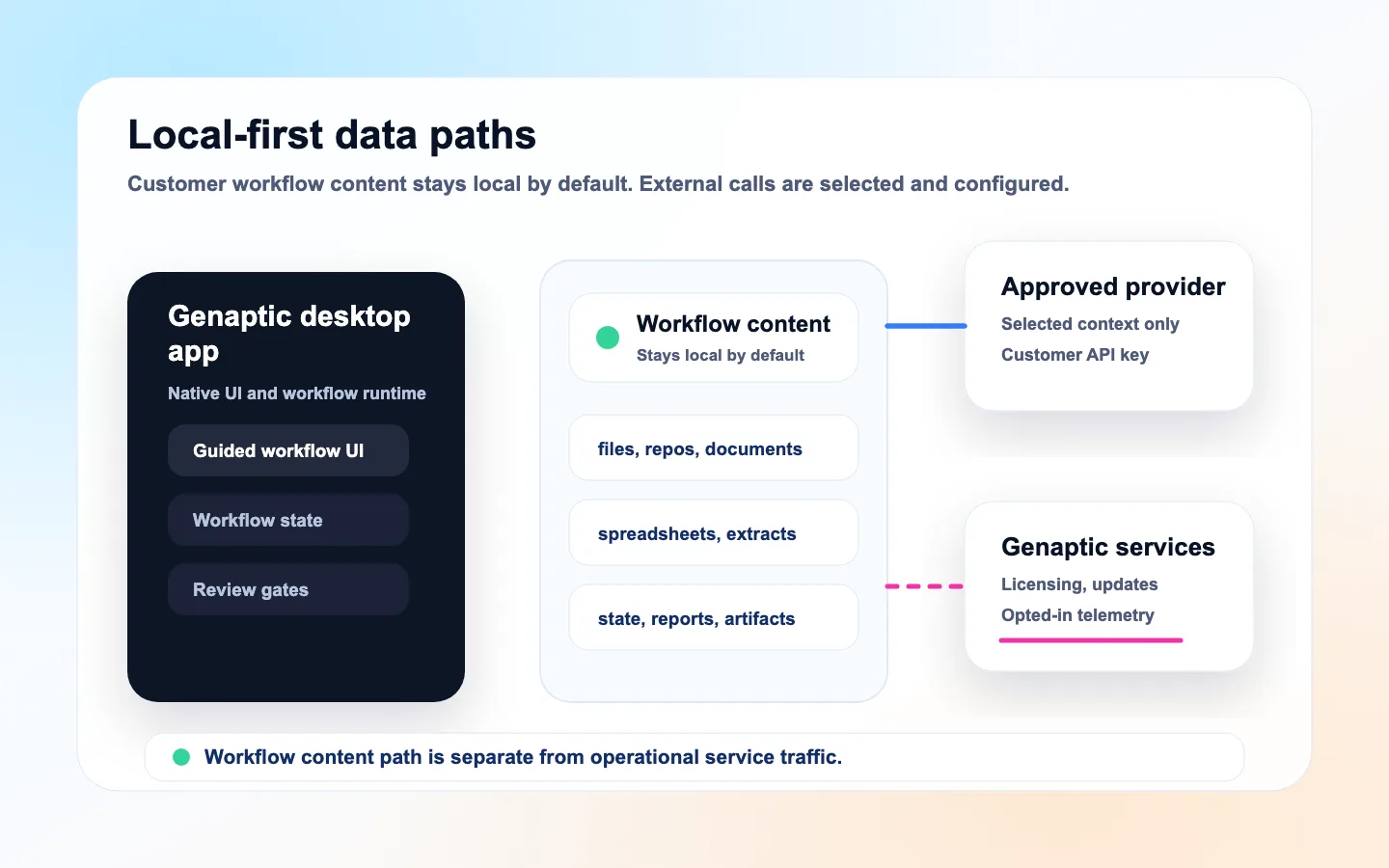
Local-first does not mean every workflow runs offline. Some workflows should use frontier cloud models when the reasoning, synthesis, or generation task justifies the cost and data path. Others can stay closer to the desktop, using local models and local tools when the task scope, privacy requirement, latency target, or cost envelope makes that the better fit. Fully offline paths are possible only when the required models, tools, policies, and validation steps are all available locally; other workflows are designed to call approved cloud providers intentionally.
Model choice and smaller workflow nodes
The useful question is not whether every task should use the largest available model. The useful question is which model or tool is appropriate for each workflow node.
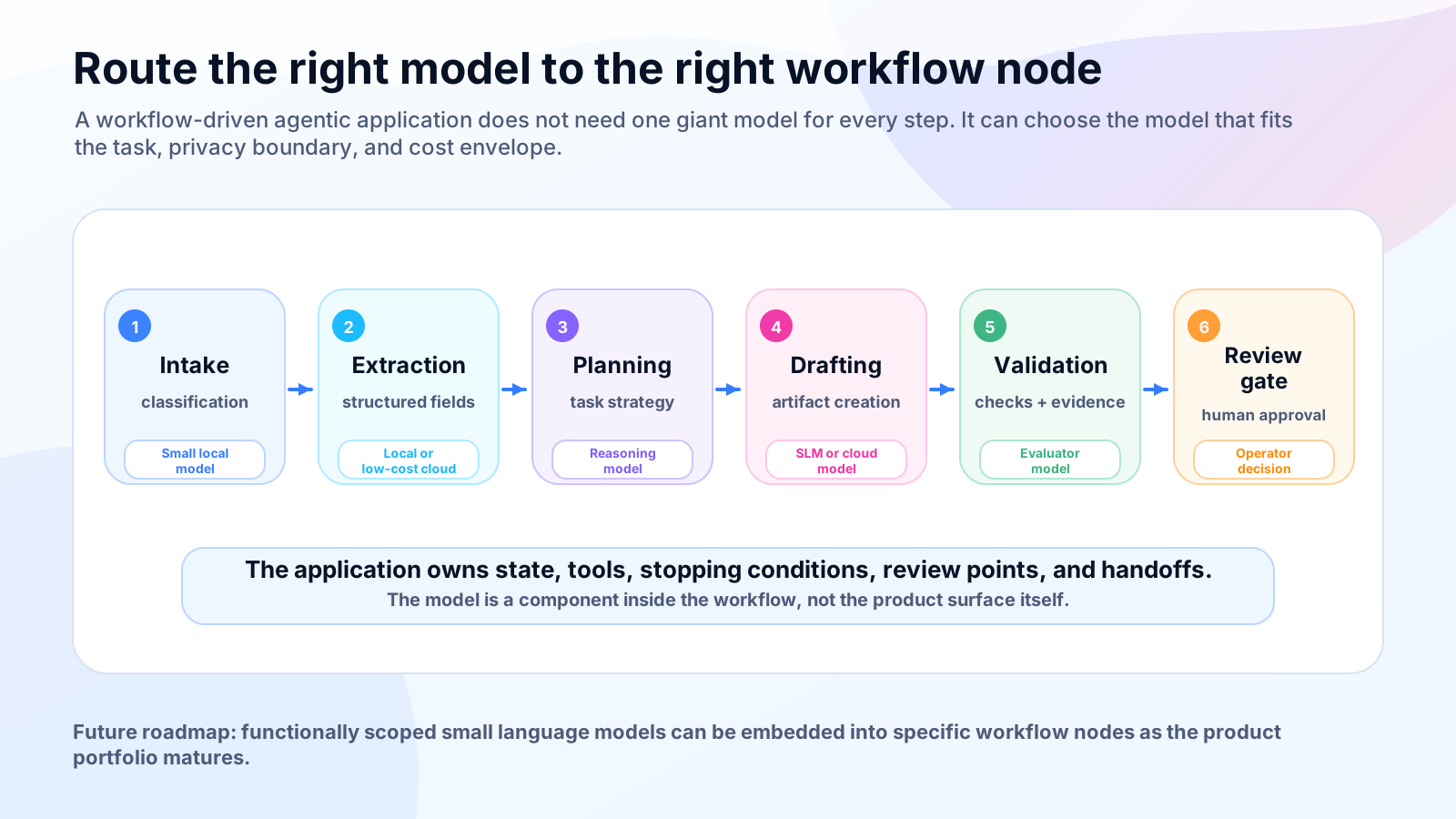
A planning step may require a strong reasoning model. A classification step may work well with a smaller model. A validation step may be better handled by a deterministic tool. A review step may combine model feedback with schema checks, tests, and human approval.
The trend toward smaller capable models makes this design more practical. Microsoft’s Phi work shows that small language models can be useful in low-latency and resource-limited environments while continuing to improve in reasoning capability. Microsoft also describes Phi models running locally across Windows devices. (Microsoft Azure)
For Genaptic, this points to a practical product direction. As the portfolio matures, we expect to evaluate functionally scoped small models for workflow nodes where latency, privacy, cost, and task scope make them a better fit than frontier cloud models.
A different economic model
Many AI applications bundle software access and model usage into a credit system. That can be convenient. It can also make provider choice, usage margins, and cost drivers harder to inspect.
Genaptic separates the application from the meter. Customers license the workflow software, then connect the model providers or local runtimes they already trust. That keeps the software relationship clear while making model choice, usage, and cost decisions visible to the customer instead of hidden inside a generic credit bundle.
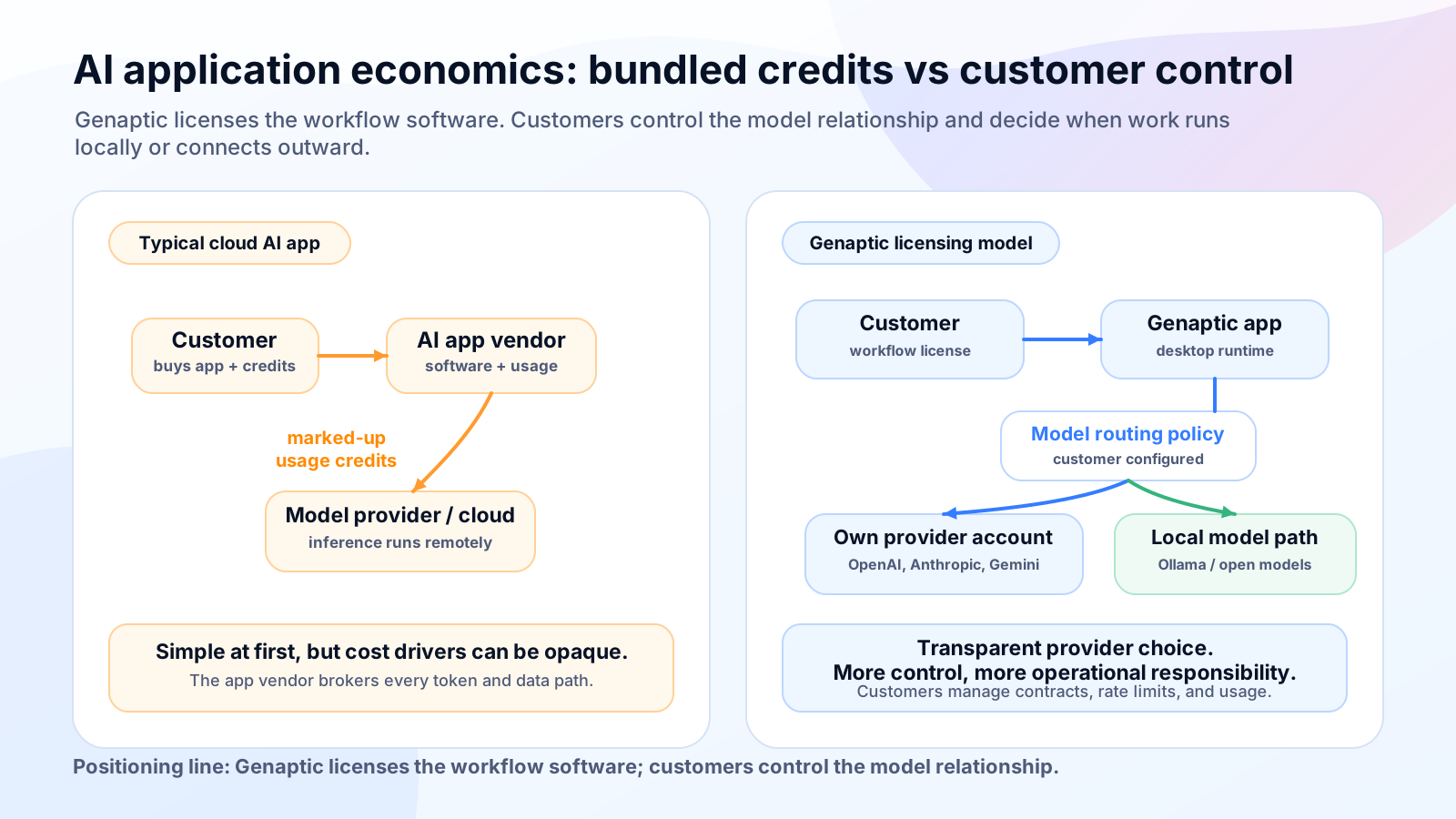
This model is designed for teams that already have approved model providers, need clearer cost attribution, or want to route different workflows across cloud and local models. Public API pricing pages show why this matters. OpenAI’s pricing page, for example, separates model prices, cached inputs, tool costs, batch processing, service tiers, and enterprise options such as data residency and reserved capacity. (OpenAI)
A customer-managed model layer also has tradeoffs. Customers may need to manage procurement, provider configuration, rate limits, observability, support paths, and local hardware costs where applicable. Some buyers will prefer bundled usage and a single invoice.
Genaptic is built for the cases where control is worth that operational responsibility. Our role is to provide the application, workflow orchestration, review surface, local runtime, and model-routing configuration.
Governance and risk
Governance is becoming a central part of AI adoption.
Cisco’s 2026 Data and Privacy Benchmark Study found that 90% of surveyed privacy and security professionals say their privacy programs have expanded due to AI, and 93% plan to allocate more resources to privacy and data governance over the next two years. Cisco also reports that 23% of organizations still lack a dedicated AI governance committee. (Cisco)
IBM’s 2025 Cost of a Data Breach Report connects this governance gap to operational risk. IBM reports that ungoverned AI systems are more likely to be breached and more costly when they are, and that 63% of organizations lacked AI governance policies to manage AI or prevent shadow AI. (IBM)
That is why Genaptic focuses on bounded workflows. The product should make the control points visible: where data comes from, which model or tool is used, what the workflow produced, and where human approval is required. Those controls become practical when the application limits context, preserves state, shows evidence, captures reports, and makes exceptions visible instead of leaving them buried in a chat transcript.
Agentic workflows with bounded roles
Gartner has predicted that more than 40% of agentic AI projects will be canceled by the end of 2027 because of escalating costs, unclear business value, or inadequate risk controls. Gartner also warns about “agent washing,” where existing assistants, RPA systems, and chatbots are rebranded as agentic AI without substantial agentic capabilities. (Gartner)
Genaptic’s response is not to make the agent more mysterious; it is to make the workflow more explicit. An agentic workflow application should know what kind of work it is trying to complete before a model begins acting: the input shape, allowed tools, model choices, validation rules, stopping conditions, review points, and output format.
That leaves room for different levels of autonomy. Some workflows will use role-bounded agents, others will use a sequence of smaller model calls and deterministic checks, and others will be mostly ordinary software with one or two model-powered steps. The application should choose the simplest useful design for the task, with complexity coming from the work itself rather than the label attached to the product.
Gent is the first proof point
Gent is where the Genaptic pattern first becomes concrete. The workflow brings local context, explicit state, controlled model use, validation, and review into software development. Instead of starting from a blank coding prompt, it starts with a local source tree, Markdown specs, guardrails, and goldens. The result is an auditable source-code workflow that a developer can inspect before accepting.
That product shape matters because Gent is not a generic coding chatbot. It is Genaptic’s first product proof point: a desktop-native agentic AI CLI for specification-driven software development. The public Gent site describes the workflow as planning -> plan_review -> execution -> validation -> review, with generated reports and workflow state written under .gent/. (Gent)
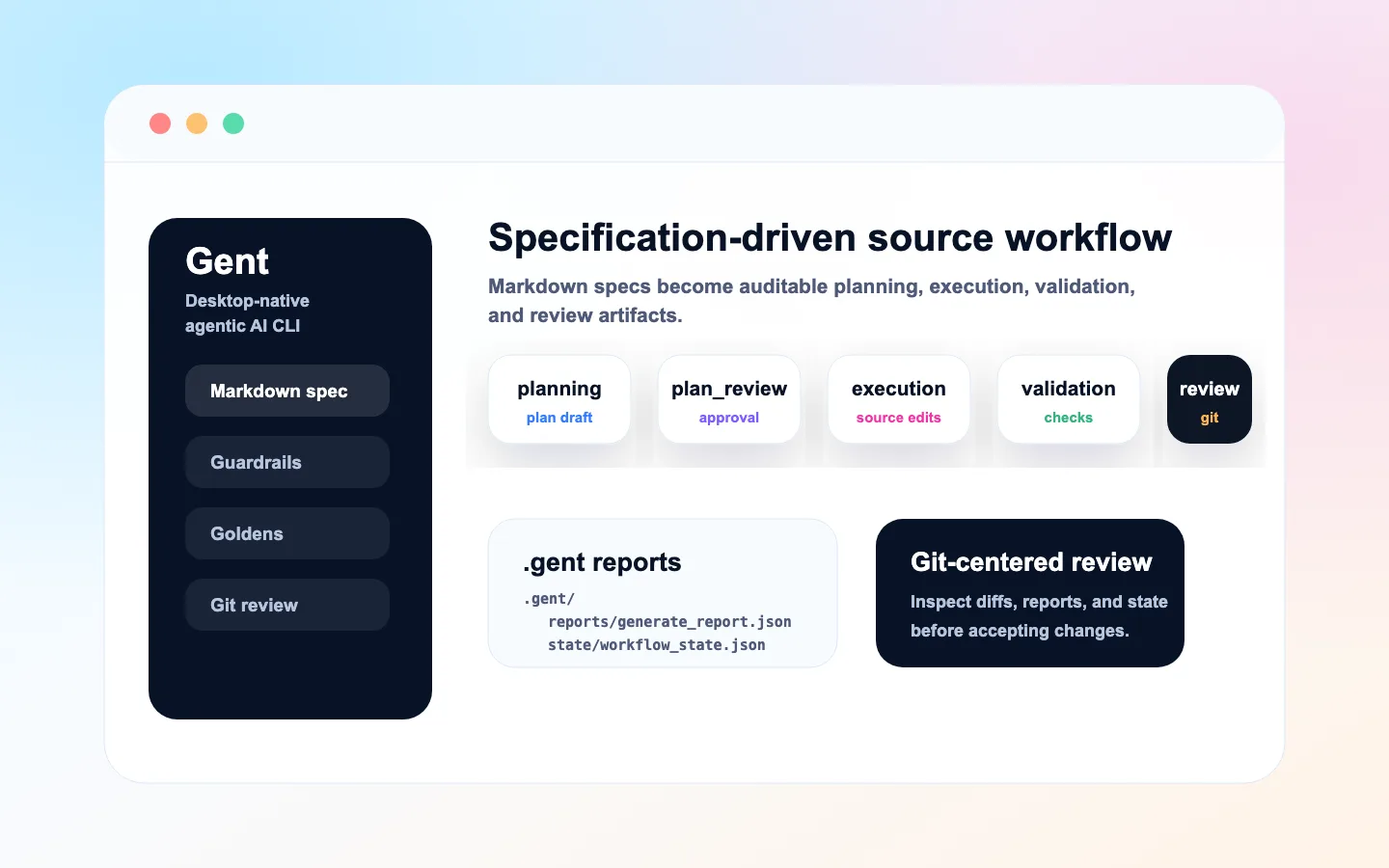
In practice, Gent begins with the material developers already use to describe intended work: a Markdown specification, project guardrails, and any goldens that define expected behavior. From there, Gent produces a reviewable implementation plan before execution begins, so the user can inspect the approach before source files change.
After the plan is approved, role-bounded agents generate changes against that plan. Validation then runs against goldens, tests, linting, and schema reports, and the user reviews the resulting artifacts before deciding what belongs in the normal git workflow. Gent keeps specifications, generated source, runtime state, and review artifacts in distinct lanes, which is why it fits teams that want AI-assisted software generation without turning delivery into a black box. (Gent)
How Genaptic will grow
Genaptic is the corporate brand behind an upcoming portfolio of desktop-native AI workflow applications. Each product can serve a specific market with its own site, roadmap, support path, and product identity, while sharing the same underlying approach.
That foundation is a local-first runtime for high-context work, a customer-managed model layer, explicit workflows with bounded model roles, human review at important decision points, and artifacts that can be inspected, validated, and handed off.
That standard matters because Genaptic products are judged by the work they help finish. A good workflow should leave the user with a reviewable code change, report, draft, classification, analysis, or handoff, along with the context, evidence, model path, checks, and approval points needed to trust it. It should also make cost and data movement visible enough that the team remains in control.
The invitation
If your team is evaluating AI workflows for code, documents, spreadsheets, contracts, local business data, or other high-context work where privacy, model cost, local context, and human review matter, Genaptic is building for you.
The next stage of business AI will be shaped by applications that understand the workflow, respect the operating environment, and help people finish real work with control.
Sources and further reading
- McKinsey, The State of AI: Global Survey 2025. (McKinsey & Company)
- BCG, Are You Generating Value from AI? The Widening Gap. (BCG Global)
- Gartner, Worldwide AI Spending Will Total $2.5 Trillion in 2026. (Gartner)
- Gartner, Over 40% of Agentic AI Projects Will Be Canceled by End of 2027. (Gartner)
- Cisco, 2026 Data and Privacy Benchmark Study. (Cisco)
- IBM, Cost of a Data Breach Report 2025. (IBM)
- Nielsen Norman Group, AI Chat Is Not Always the Answer. (Nielsen Norman Group)
- Anthropic, Building Effective Agents. (Anthropic)
- Microsoft Azure, One Year of Phi: Small Language Models Making Big Leaps in AI. (Microsoft Azure)
- OpenAI API Pricing. (OpenAI)
- Gent product site. (Gent)